



Obsidian as a Corporate Brain: Knowledge, MCP and AI
Every company invests in structured data: data warehouse, dashboard, indicator, integration. But the knowledge that actually decides a project almost never lives in a table. It sits in the minutes nobody re-read, in the email where the client explained why they rejected the previous architecture, in the ticket showing that this error has already happened twice.
That body of material is unstructured and, for that reason, it dies in inboxes. On the other hand, it is exactly what generative AI reads well. What is missing is a place where this content can live organised, and a safe path to the assistant. At Inove, the place is a corporate Obsidian vault and the path is MCP.
The problem: a company’s real knowledge is not structured
Try the exercise. Where is it recorded why the company chose one hyperscaler over another? And the decision to keep a legacy system for another two years, along with the reasoning behind it?
In practice, the answer is usually: scattered. One piece in an old presentation, another in an email thread from someone who has since left, another in an analyst’s memory. It is the same pattern we see in IT support: the context lives in the heads of one or two people, and every new incident costs as much as if it were the first.
There is also a silent cost. With no accessible context, every decision is taken from scratch — the team redoes analysis already done and reopens discussions already closed. It is not a lack of competence: it is a lack of organisational memory.
Why a graph of notes beats folders and dead wikis
The shared folder fails because it requires you to know where to look before you look. The corporate wiki fails for a different reason: it starts out beautiful, ages fast and becomes a graveyard of pages nobody dares delete.
An Obsidian vault works differently, for three reasons. First, it is Markdown in text files: no proprietary database, no lock-in, versionable in Git, readable ten years from now. Second, the content organises itself through links between notes, not through a folder hierarchy — the incident note points to the client note, which points to the environment note, which points to the architecture decision. The path exists even when you cannot remember the file name.
Third, and this matters most here: plain text with links is the ideal format for an AI to consume. A PDF needs extraction, a spreadsheet needs interpretation. A Markdown note with headings, lists and cross-references reaches the model practically ready.
MCP: the standard socket between your knowledge and AI
Translating the acronym into business language: MCP (Model Context Protocol) is an open standard that defines how an AI assistant connects to a company data source. Think of the three-pin plug — before it existed, every manufacturer had its own connector and nothing fitted.
Without MCP, integrating AI with internal knowledge means writing a bespoke connector for each assistant — and redoing everything when the tool changes. With MCP, you expose the source once, with its own access rules, and any compatible assistant can then see it.
On security, the difference is significant. MCP does not dump the archive into the model: it offers controlled operations — search, read, create, edit. What is exposed is defined by you, on the server, not by the prompt on the other side.
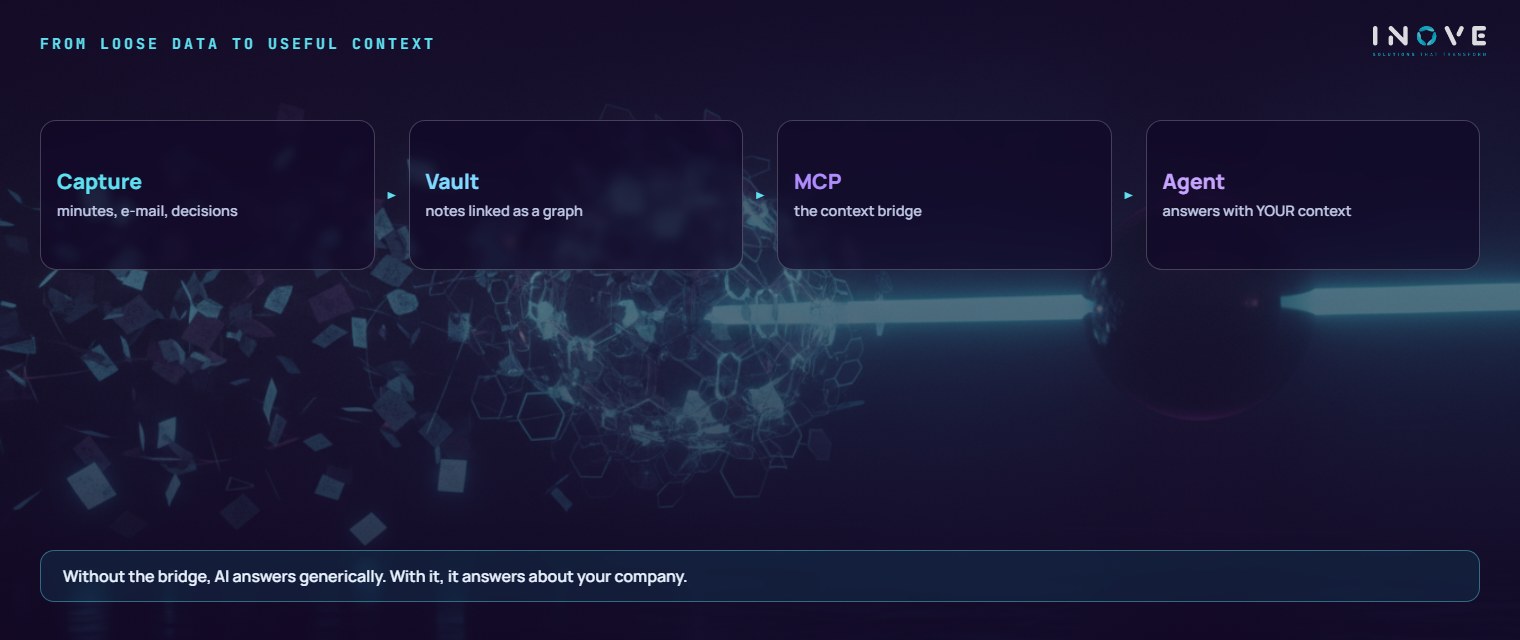
Reference architecture: four pieces, no mystery
The design fits into four blocks. The vault is a folder of Markdown files on a dedicated server in the cloud — not in a personal sync folder, which is where this kind of initiative usually dies. Continuous synchronisation replicates the vault between server and workstations, with version history.
The MCP server exposes the vault: it publishes a reduced set of operations and applies permissions by scope — this agent reads only this area, that one writes only in that folder. And the agent consumes all of it and answers already knowing what the matter is about.
None of this demands an exotic stack: a small instance, an encrypted disk, key-based access, a restorable backup. It is conventional infrastructure done well — and it is precisely because it is conventional that it survives the initial enthusiasm.
Governance: what goes in, who writes and what must never go in
This section decides whether the project becomes an asset or a liability. Start with what goes in: decisions and the reasons behind them, environment designs, root cause of incidents, service context. The criterion is simple — if somebody will need this in six months and will not remember it, it becomes a note.
Next, who writes: the whole team, with one golden rule — a short, dated note is worth more than a perfect document that never ships. One note per decision, per client, per environment. And whoever touched the subject updates the note the same day.
Finally, what must never go in — and here there is no exception:
- Credentials, keys and tokens. Those live in a secrets vault. A vault read by an agent has, by definition, a larger exposure surface.
- Personal data of data subjects. National ID numbers, addresses, health data, customer bases. Brazil’s LGPD requires purpose and minimisation; a context note is not a personal database.
- Documents under contractual confidentiality that the contract does not allow to be replicated outside the client’s environment.
Add to that the basics of cybersecurity: encryption at rest and in transit, named access, logs of who read what, defined retention and — the most forgotten of all — tested restoration. A backup never restored is hope, not control.
How Inove uses it in practice
We run a corporate vault on a dedicated server in the cloud, continuously replicated and connected to our assistants via MCP. Three things live there: project memory (what was done, in what order, with what result), dated decisions and service context.
The effect shows up in the conversation. When a subject comes back months later, the assistant does not start from scratch: it recovers the history, remembers the constraint that existed and avoids the suggestion already ruled out. The service feels tailored because the context is real, not because somebody wrote a better prompt.
There is a secondary gain: the quality of internal writing has gone up. When a note will be read by a person and by an agent, people write with more precision.
The first 30 days: start small on purpose
- Week 1 — one domain only. One client, one project, one environment. No “let’s document the company”. Stand up server, vault and backup.
- Week 2 — minimum standard. Title, date, owner, links. Three or four note types, not fifteen. Write the policy on what never goes in before the first note.
- Week 3 — MCP in read mode. Search and read only, restricted scope. Let the team ask questions and watch where context is missing: the gap reveals itself.
- Week 4 — enable writing and measure. The agent starts recording notes in the defined area. Measure one thing: how many questions the team answered without bothering another person.
If by the end of the month the vault holds forty useful notes and not a single password, the model stands. The rest is repeating the cycle in new domains.
To go deeper, combine this design with the material from Inove Academy: the Cybersecurity and LGPD e-book completes the information classification and the accountability for personal data, and the quick guide to cloud migration helps you decide where to host the vault server.
The thesis is modest, and that is why it works. You do not need an AI project to have useful AI in the company: you need a place where knowledge is written down, a standard door the AI knows how to open and a clear rule about what never crosses that door. The corporate brain is not born from a new tool — it is born from the habit of recording what was decided, somewhere the machine can also read.
Frequently asked questions
Why a graph of notes instead of folders or a wiki?
What is MCP in this design?
What should never enter the corporate brain?
Giving the model context is the missing layer in most applied AI projects.