



GCP landing zone with Terraform: the build order that avoids rework
Almost every cloud project starts wrong in the same way: someone creates a project in the console, spins up a machine to test something, the test becomes a pilot and the pilot becomes production. Six months later there are thirty projects with no naming standard, permissions granted to individual e-mail addresses, overlapping networks and a bill nobody can explain. The landing zone is the opposite of that: the cloud foundation designed before the applications, described in code and built in an order that avoids rework.
This article is the practical companion to our piece on Terraform with AI, which covers the method and the guard-rails of infrastructure as code. Here we show the real build sequence for a foundation on Google Cloud: what comes before what, where AI genuinely helps and which cost decisions have to be born alongside the first line of code.
Why “landing zone” and not “create a project and see how it goes”
The one-off project looks harmless because it carries no decision cost. The problem appears when it has to coexist with others. A landing zone settles four things at once — and all four are expensive to settle in a hurry.
- Hierarchy. In GCP, organisation, folders and projects are not cosmetic: they are the point at which policies and permissions start being inherited. An organization policy that blocks external IPs, applied to the production folder, holds for everything created inside it — including the project someone spins up tomorrow without telling anyone.
- IAM from day 1. The stray project almost always starts life with a personal owner. That is immediate debt: when the person leaves the company, nobody knows what breaks if the access is removed.
- A planned network. IP ranges are chosen once. Two overlapping subnets make peering impossible, and they only surface on the day the environment has to talk to the rest of the business.
- Billing split by environment. Production, staging and development in separate projects is what makes cost legible. Without it, any FinOps conversation starts with three weeks of archaeology.
On top of that, once the foundation is in place, standing up a new environment stops being a project and becomes a code run.
The build order that avoids rework
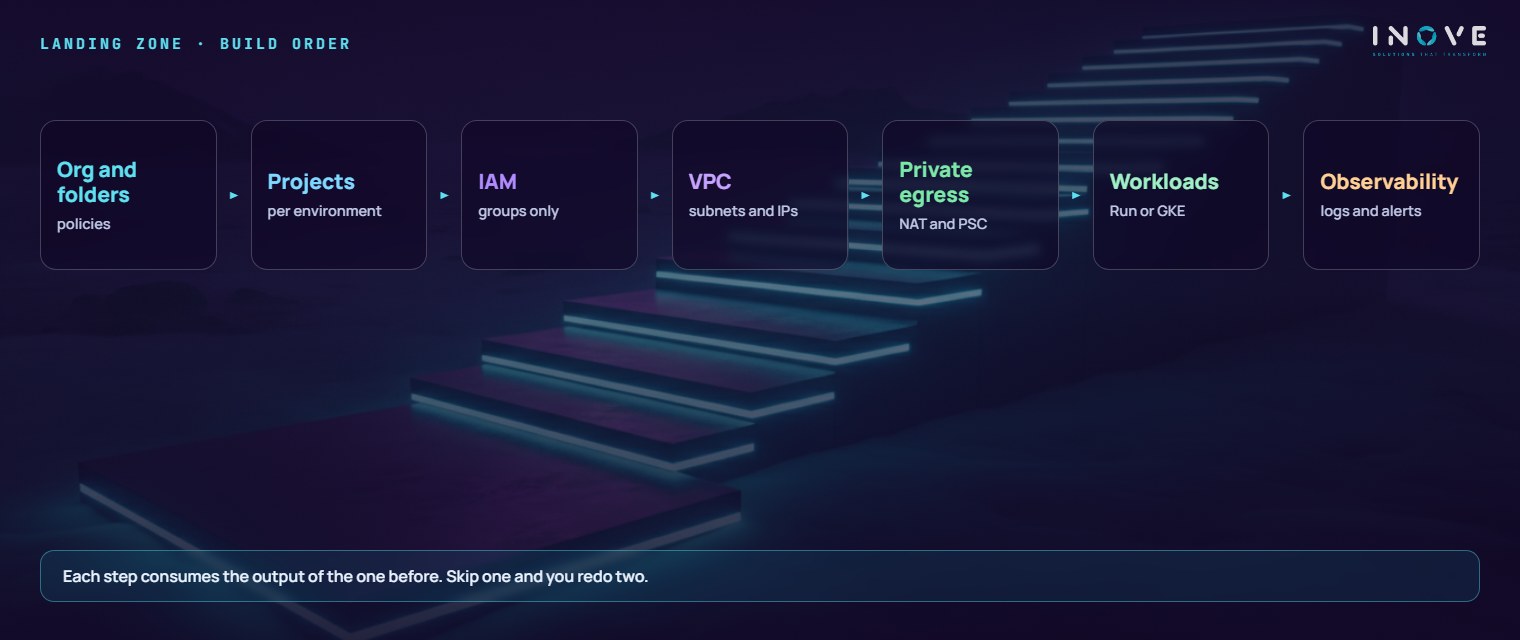
The sequence below is not about elegance: each layer consumes the output of the one before it, and inverting the order means doing the work twice.
- Organisation and folders. The tree comes first: folders by environment (production, non-production) and a shared one for networking, logs and tooling. This is where the organization policies that hold forever belong: permitted regions, a ban on static keys, blocking public access to storage.
- Projects per environment. One project per environment and per domain of responsibility, with a standardised name and billing attached. The project is GCP’s unit of quota, isolation and cost — using few of them “to keep things simple” is the most common mistake and the most expensive one.
- IAM through groups, never direct users. Permissions go to corporate directory groups, and people join and leave those groups — a role attached to an individual e-mail address is not auditable in practice. The same rule applies to service accounts: minimum scope, one per application, with impersonation instead of keys.
- VPC and subnets. This is where the shared VPC comes in: one network in a host project, consumed by the service projects, so that no application has to invent its own. Plan the ranges with room to spare and keep the addressing plan in the repository, not in a spreadsheet.
- Connectivity. Egress through Cloud NAT, so the workload never needs a public IP; firewall rules by service account or tag, not by loose range; and Private Service Connect wherever there is a managed database — a database with a public IP is the recurring finding of every security assessment.
- Workloads. Only now do Cloud Run or GKE enter the picture. The choice is an operational one, not a matter of fashion: Cloud Run charges per request and disappears when there is no traffic; GKE gives fine-grained control and charges for the cluster even while it sits idle.
- Observability. Last, what closes the loop: centralised log sinks in a project of their own, defined retention and alerts with a real destination — not a mailbox nobody reads.
What AI speeds up here
A landing zone is repetitive, structured work — exactly the shape of task where AI assistants pay off. Four uses cover their cost in the very first environment.
- Reusable modules. Describing “a standard project with APIs enabled, a service account, mandatory labels and a log sink” and getting back the module with variables and outputs takes the mechanical work out of the way. The real gain is consistency: the fifth project comes out exactly like the first.
- Reviewing the plan for destruction. In a foundation, the danger is not creating one resource too many — it is the
planproposing to recreate a subnet because someone touched an immutable attribute. A summary of what will be destroyed or forced to be recreated turns hundreds of lines of diff into a short list you can decide on. - Landing zone documentation. A project table, the addressing plan and a matrix of groups and roles, generated from the real code — and therefore still true a month later.
- Turning a design into code. Going from the diagram to the first skeleton of modules is where AI saves the most time — provided the design already carries the network and hierarchy decisions taken by people.
State and security of the foundation itself
The code that creates the entire cloud is the most sensitive asset in the environment. Three rules are not up for negotiation.
First, the state lives in a dedicated bucket, inside a tooling project of its own, with versioning switched on and concurrency locking in place. Versioning lets you come back from a corrupted state; the lock stops two simultaneous apply runs destroying the file. Access is restricted: whoever reads the state reads the full inventory of the environment.
Second, one service account per pipeline, with the least privilege that still allows the work to happen — the identity that applies production is not the one that applies development. Third: no static keys in the repository. Authentication must go through identity federation, with short-lived credentials issued on the spot. A service account key in a JSON file is the leak that turns up most often in audits — and the organization policy that forbids creating them should be switched on from day one.
FinOps from the foundation up
Cost is not a month-six subject. Two things are born with the landing zone. The first is mandatory labels — environment, cost centre, application, owner — applied by the module and blocked in the pipeline when they are missing: a resource with no label is a resource nobody can explain on the invoice. The second is a budget with alerts per project, with percentage thresholds and a recipient who actually follows them.
And there is a field lesson worth more than any generic rule. During a FinOps assessment on Google Cloud for a Brazilian insurer, we found CUDs (committed use discounts, one- to three-year usage commitments) contracted for a managed database with virtually no utilisation, and flexible compute commitments consumed at less than half. The discount existed on paper; the spend stayed there, month after month, with nothing in return.
Landing zone checklist
- Organisation and folder hierarchy in code, with inherited organization policies.
- Projects separated by environment, with the name standardised by the module and billing attached.
- IAM through groups only; no role on an individual e-mail address; service accounts with minimum scope.
- IP addressing plan documented, with no overlap with the on-premises network.
- Shared VPC with a host project and firewall rules by identity, not by range.
- Cloud NAT on egress; private access to managed services; no database with a public IP.
- State bucket with versioning, locking and restricted access.
- Pipeline with federated identity and no static keys;
planon the pull request andapplyonly after approval. - Mandatory labels validated in the pipeline and a budget with alerts per project.
- Centralised log sinks, defined retention and alerts with a real recipient.
- Periodic drift checks, with the correction made in the code.
To go deeper before the first module, two resources help. At the Inove Academy, the quick guide to cloud migration sets out what should go across by lift-and-shift and what deserves a redesign — a decision that changes the shape of the landing zone. And the FinOps calculator gives the order of magnitude of the waste before any commitment: precisely the measurement that is missing when a CUD is bought on impulse.
In the end, a landing zone is not a handsome architecture deliverable. It is the difference between a cloud that grows by addition and one that grows by patching. The first absorbs the next application in hours; the second charges you, with every new workload, the price of the decisions nobody wanted to take at the start.
Frequently asked questions
What is a landing zone?
What happens when you skip it?
Can a landing zone be applied to an environment that already exists?
Foundation before applications is how we start any cloud services project.