



Classifying incoming invoices in SAP: read the XML and post without typing
The invoice has arrived. The XML is intact, signed and cleared by SEFAZ (the Brazilian state tax authority) — and completely useless until someone says what it actually is inside your SAP. Which general ledger account takes it? Which cost centre? Is it a material or a service? Which inbound CFOP (the Brazilian tax operation code) applies? Is the credit recoverable? Does it go to fixed assets, to consumption or to resale?
This is the work that consumes the tax accounting team every month: not checking the invoice, but classifying it. And it is work the company has already done thousands of times — because the same supplier, with the same item description, has been classified the same way for the past three years. The knowledge exists. It is simply scattered across old documents and the memory of two people.
The XML says everything except what your accounting needs
The invoice carries what the issuer declared: the product description from their own catalogue, the NCM (the Brazilian goods classification code), the CFOP for their outbound operation, their CST (the tax status code), values and taxes stated. None of that is your classification.
The CFOP on the invoice is the supplier’s outbound code. Your inbound CFOP depends on your operation, your tax regime and where the item ends up. The description belongs to their catalogue — “HEX BOLT M8 ZINC” — and you need to know whether that is factory maintenance material or an item for resale. The NCM helps with tax classification, but says nothing about your general ledger account or your cost centre.
In other words: reading the XML solves extraction and does not solve the decision. That is why OCR tools and “invoice workflow” products tend to disappoint — they attack the part that was already solved.
What “classifying” means inside SAP
On an entry with no purchase order — expense, service, indirect material, freight — someone has to fill in, line by line:
- General ledger account or material, when the item exists in master data.
- Cost centre, internal order or project: whoever consumes the expense.
- Inbound CFOP, consistent with the operation and with what the supplier declared on the outbound side.
- CST and tax treatment: what is a recoverable credit, what forms part of cost, what is exempt.
- Type of operation: consumption, resale, fixed assets, industrialisation, shipment.
- Service withholdings, where they apply — and this is where mistakes get expensive.
Multiply that by dozens of items and hundreds of invoices a month. That is the volume that makes the close run late.
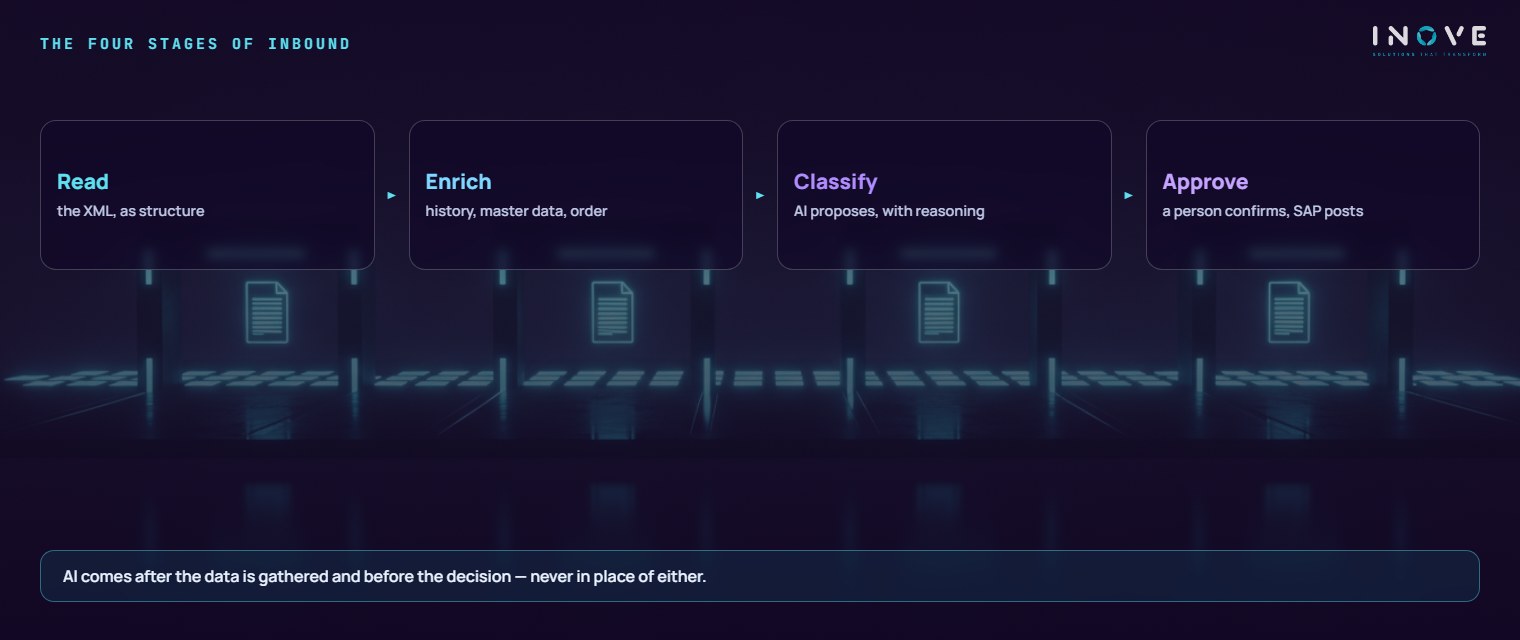
Read. The XML arrives from the tax inbox, the supplier portal or the messaging service and is turned into structure. There is no AI here and there should not be: turning XML into fields is a job for a parser, and a parser does not invent values.
Enrich. Before classifying, you gather the context that exists only in your own house: how this supplier was classified on recent invoices, whether there is a linked purchase order, what the material master says, which cost centre usually takes this kind of expense, what tax treatment was applied last time.
Classify. The AI receives the XML line plus that context and returns the full proposal — account, cost centre, inbound CFOP, CST, credit treatment — with a confidence level and a justification: “across the last 34 invoices from this supplier with a similar description, the item was posted to this account and this cost centre”.
Approve. Whoever answers for tax accounting confirms, adjusts or rejects. The document is created in SAP through the normal route, and the decision goes back into the history — which is what makes the next proposal better.
Why AI performs well precisely here
Invoice classification is the kind of problem where a language model is strong: the right answer lies in the company’s own past, written in free text, with spelling variations and no rigid pattern.
“HEX BOLT M8 ZINC”, “Hexagon bolt M8 zinc-plated” and “HEX. BOLT M8” are the same item to any person and three different strings to an exact rule. That is precisely the difference a model grasps without anyone writing the dictionary.
Three characteristics make this case favourable, and they are worth naming because not every AI case has them:
- The labels already exist. Every invoice posted in the past is an example classified by a human. There is no training set to build: it is already in the ERP.
- Accuracy is verifiable. Either the item went to the right account or it did not. You can measure the hit rate by supplier and by expense type.
- The cost of error is contained, provided a person approves before posting. A wrong proposal costs a click; a wrong posting costs an amended filing.
In practice, the repetitive items — the bulk of the volume — arrive with the proposal right and confidence high, and the person spends the day deciding the exceptions, which is where they add value. It is the same logic we described in data conversion with AI: reviewing a proposal is far cheaper than drafting from scratch.
n8n in the middle, SAP as owner of the posting
We use n8n — an open-source automation orchestrator — as the conductor of the flow, and SAP remains where the document is born. n8n runs on the client’s own infrastructure: it fetches the XML, assembles the context, calls the model, presents the proposal and returns the decision to the ERP through the standard integration.
Three practical reasons for this design, in a tax process:
The data stays at home. An invoice carries supplier, price and volume. With the orchestrator inside the environment, that information does not travel through a third-party cloud — which simplifies the privacy conversation.
The rules are yours. Approval limits, confidence thresholds and exceptions become versioned, reversible configuration, not a form on a vendor’s portal that nobody knows who changed.
Cost follows usage. Invoice classification is high in volume and low in unit value; per-transaction licensing penalises exactly the case that benefits most from automation.
The honest counterpoint: n8n needs someone who can operate, monitor and version it. Without that, it becomes yet another orphan system — the same discipline as data and integration, where a flow is a product and not a one-off script.
When the system message points to the wrong place
One real case is worth telling, because it explains a project precaution. In a client’s SAP environment, incoming invoice verification rejected a document with an error pointing to the tax domicile of the receiving plant. The obvious reading was a missing jurisdiction or municipality in master data.
It was not that. We set up the jurisdiction, confirmed it in the database, and the error persisted. We tested the next hypothesis, taken from a vendor note about a condition flagged as manual, and ruled it out with evidence: no condition in that scheme was manual.
The cause only surfaced through debugging. An ICMS base condition — ICMS being the Brazilian state VAT — that must exist at 100% for the tax to be recognised had a validity record starting in June 2026, and the invoice was dated April 2025. Without it valid on that date, the calculation did not produce the line the finance side looks for, and the system returned a message about tax domicile. The wording bore no relation to the cause.
The lesson for anyone automating: the ERP message is a clue, not a diagnosis. Automation that routes tickets by error text sends half the queue to the wrong person. That is why, in our design, the AI works on the document and the history — not on the message. The full method for this kind of investigation is in SAP troubleshooting with AI.
How we start
- Measure today. How many invoices a month, how many line items, how much classification time and how many amended filings in the past year. Without a baseline, gains are opinion.
- Extract the history. Invoices already posted become the base of examples. It is the step that delivers most and is most underestimated.
- Run in shadow. The AI classifies in parallel, outside the flow, and we compare it with what the person did. That gives the real hit rate by supplier and by type — before any promise.
- Open up in bands. Start with the suppliers and expense types where accuracy is consistent. The rest stays manual until it earns its place.
- Keep watching. A dashboard of acceptance rate, correction rate and what fell through to review. Accuracy that drops is a sign that something changed in the business.
What remains afterwards
The visible gain is a close that stops running late. What lasts is something else: the classification criteria leave the heads of two people and become searchable history, with justifications. When someone goes on holiday, invoices keep coming in.
And there is the trail: for each item, what the automation proposed, with what confidence, who approved it and with what adjustment — the same material that answers an audit or a dispute with a supplier.
The honest limit: this does not fix bad master data. If a material is set up wrongly, the correct classification will still go to the wrong place. Automatic classification tends to be exactly what reveals the scale of master data inconsistency — an uncomfortable discovery, but the beginning of the fix.
To prepare the ground, two routes at the Inove Academy. The e-book on Brazilian Tax Reform and SAP shows why the volume of tax rules is set to grow — and rules that grow inside a spreadsheet turn into a queue. And if your environment still depends on GRC NFE (the legacy SAP add-on for Brazilian electronic invoicing), the conversation starts earlier: see SAP DRC and the Tax Reform.
Frequently asked questions
Doesn’t the invoice XML carry everything SAP needs?
Why does AI do well precisely at this classification?
Does posting move outside SAP?
Incoming invoice classification with the posting inside SAP is one of the deliverables of SAP tax and DRC.