



SAP Troubleshooting with AI: Three Real Investigations
Every serious incident starts the same way. An error message pointing to the wrong place, a user describing half the symptom, and an SLA clock running. The hard work is almost never applying the fix — it is working out which of the twelve plausible causes actually happened. Anyone who has investigated production knows it: the bottleneck was never writing up the ticket, it was cross-referencing scattered signals.
That is where AI genuinely helps — and not where the market pitch usually puts it. An assistant does not guess the solution to an SAP incident. It steers the investigation: it reads the whole dump without skipping a line, cross-references evidence from one transaction against another, proposes a hypothesis and, most valuable of all, tells you which test confirms or rules it out. What follows are three real investigations — all anonymised — and the method they left behind.
The bottleneck was never the fix
In most incidents, the final fix fits on one line: activate a repository, remove an alias, adjust the validity date of a condition. What costs is building the causal chain that leads to it. It comes down to an asymmetry every support team knows: the error message tells you where the program stopped, not why it stopped.
This is not unique to the ERP: the same asymmetry shows up in the firewall rule that “disappears” and in the cloud permission that only fails at peak hours. That is why we treat investigation as a support discipline, not as individual talent.
Three investigations
1. The jobs that should have existed and did not
The symptom arrived from the business: approvals stuck, workflow going nowhere. The team’s natural reading was that somebody had deleted or suspended the jobs. But the scheduler was not showing suspended jobs: it was showing absence — dozens of standard routines that should have been there simply did not exist.
The question shifted from “who stopped the jobs?” to “who should have created these jobs?”. Those technical routines are not built by hand: they are generated by the Technical Job Repository (transaction SJOBREPO). With the repository switched off, nothing is generated — and nothing raises an error, because as far as the scheduler is concerned there is nothing wrong. The fix was to activate it and have it regenerate.
The temptation was to create the jobs by hand: it would have worked for a few weeks and broken at the next update package.
2. The inbox that stopped listing tasks
The Fiori task inbox stopped listing approvals in a production environment. The browser error was generic — failed to load the list. No clue about authorisation, workflow or service.
The evidence appeared when we compared the OData service configuration against a quality system where everything worked. The task service runs in multi-origin mode: it queries several origins and merges the result. In production there was an extra alias pointing at the local client itself, inherited from an old configuration — and one invalid origin brought down the entire response instead of being ignored.
Removing the alias brought the inbox back within minutes. What matters is the method: the comparison between environments was the evidence. Reading production alone, that alias would never have looked redundant.
3. The tax error that pointed at the wrong address
This is the favourite case of anyone who enjoys a misleading message. A tax posting failed with an error citing the tax domicile. Whole teams have lost days at this point: they review the supplier address, the jurisdiction code, the plant master data. Everything is consistent, and the error persists.
The cause was somewhere else. A tax condition in the calculation had a record valid only from a future date, and the document predated that validity start. With no valid record for the date, the calculation does not close — and the message cites the tax domicile, which is where the program gives up, not where the problem is.
Note the shape of the clue: it is not a wrong value, it is a date. Cross-checking the document date against the validity of the records is the mechanical check AI does in seconds and a tired human skips, because “that has already been verified”.
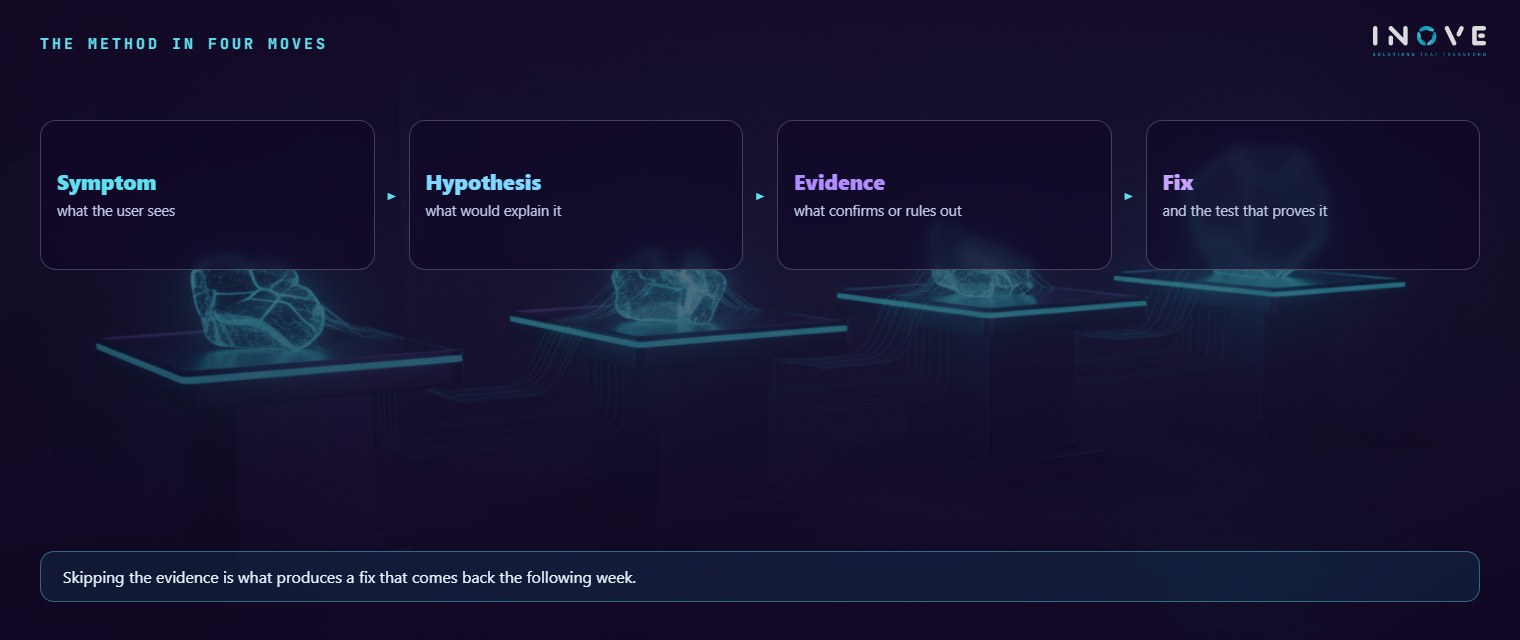
The method in four beats
The three cases follow the same design — simple enough to fit on a card, rigorous enough that nobody skips a step.
- Symptom. What the user sees, precisely: which document, which user, what time, what changed since the last time it worked.
- Hypothesis. A plausible cause, written as a testable statement. “It is authorisation” is not a hypothesis; “object X is missing from profile Y” is.
- Evidence. The test that confirms or demolishes the hypothesis: compare against a healthy environment, reproduce with another user, look at the validity of a record.
- Fix. Applied in a controlled environment, transported with a record of what was done and why.
Skipping the third beat is the costliest mistake in support. Without evidence, the “fix” is the first hypothesis applied in a hurry — and it gets a fair share of cases right, which is dreadful: the share it gets right teaches the team to keep guessing. The incident reappears weeks later in different clothes, nobody connects one case to the other, and that is how a backlog of chronic problems is born.
What changes in AMS when AI comes in
Three effects show up consistently in SAP support. None of them is “the AI resolved the ticket”.
- Time to first hypothesis. This is the indicator that drops most. Reading a full dump and correlating it with the system log and the transport history for that window is reading work, not genius — and it is exactly what AI does without tiring. The analyst reaches the decision point with three ranked hypotheses, not with a blank screen.
- Knowledge transfer. A junior with an assistant that demands hypothesis and evidence investigates in a senior’s format. What they lack is the “I have seen this before” repertoire, but they stop skipping steps — and the repertoire is built precisely there, one case at a time.
- Documentation born from the incident. The ticket record stops being a paragraph written in haste and becomes a by-product of the investigation: symptom, discarded hypotheses, evidence and fix. The knowledge base starts to hold what nobody documents and everybody redoes — the hypotheses that were demolished.
The honest limits
It is worth saying what AI does not do — discovering that mid-crisis is expensive.
- It cannot see what it has no access to. Without the log, the configuration and the comparison against the healthy environment, it works only with what you typed — and reasons very well about an incomplete reality.
- It is wrong with confidence. A wrong hypothesis arrives in the same self-assured prose as the right one. That is why the third beat is not optional: the evidence exists to arbitrate between the AI and you.
- Nothing replaces testing in a controlled environment. Fixes validated in quality and transported with an audit trail. An assistant’s suggestion does not justify a change in production.
- Sensitive data does not go into a prompt. Anonymise first: dumps and logs carry names, documents, values and sometimes credentials. It is a security rule like any other — and it belongs in the usage policy, not in the goodwill of whoever is in a hurry.
To go deeper, two pieces from Inove Academy help turn this into routine. The quick guide to AMS and SLA shows how to structure deadlines, queues and governance — including the separation between incident and problem, which is what gives root cause analysis a formal place in the contract. And the material on SAP practices brings together the configuration and transport standards that reduce the chance of the incident happening at all.
In the end, AI did not bring a new detective to the table. It brought a tireless assistant that reads everything and keeps asking which evidence supports the conclusion. The investigation is still human — it just now starts a good deal closer to the end.
Frequently asked questions
Where is the bottleneck in a serious SAP incident?
What does AI change in the investigation?
What is the honest limit?
This investigation method is what runs day to day in AMS for SAP.