



File Server to SharePoint: Measure Before You Migrate

Every company more than ten years old has a file server nobody wants to open. Hundreds of gigabytes, folders inside folders, spreadsheets somebody built in 2014 that still feed a report the board reads every month. The plan has existed for years — “let’s migrate to SharePoint” — and it never moves, because nobody can say what breaks if you touch it.
That paralysis has a concrete, solvable cause: the project starts with the tool instead of starting with the measurement. And when somebody finally does measure, the report tends to frighten more than it helps — because it measures the wrong thing.
Why “migrate everything to SharePoint” does not work
SharePoint is excellent at what it was built for: collaborative documents, versioning, search, access control, retention. If your holdings are presentations, contracts and ordinary working spreadsheets, migrating is pure gain.
The problem shows up in one specific type of file, and it tends to be exactly the most critical one in the operation: the spreadsheet with a macro that reads from and writes to fixed paths. The one that opens other files by network path, saves its result to an agreed folder and runs at every close.
That file suffers in SharePoint for three reasons that no amount of configuration solves: file locking works differently from a network share; the latency of an operation that opens dozens of files in sequence stops being negligible; and protected view steps into the path of content arriving from the web, breaking automatic execution.
In other words: the decision is not “SharePoint or server”. It is knowing which file goes where — and for that you have to measure.
Measuring in a way that does not depend on opening files
Opening tens of thousands of spreadsheets to find out what is inside them is unworkable — and unnecessary. The modern Excel format is a compressed package: you can inspect the contents without opening the spreadsheet, by reading the file’s internal structure.
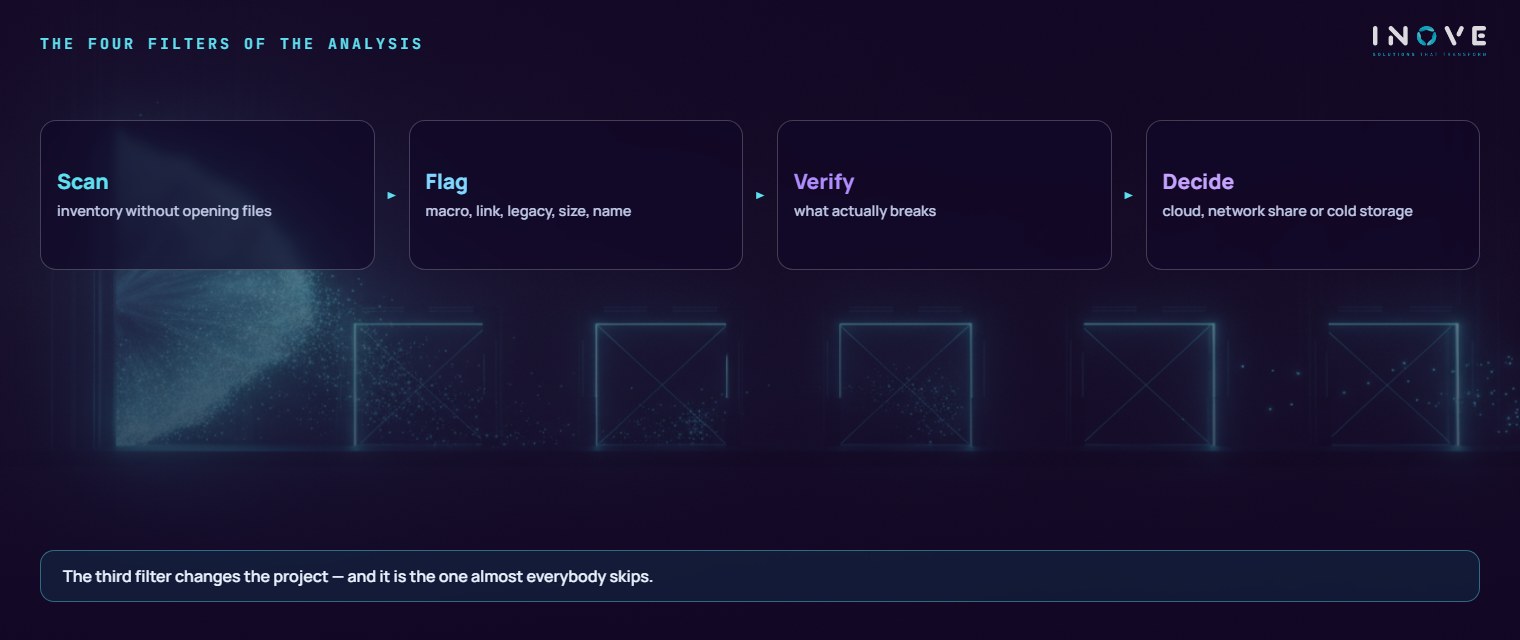
With that, a single scan can answer, file by file, what matters:
- Does it have a macro? — from the presence of the VBA project component inside the package.
- Does it have external links? — references to other workbooks declared in the structure.
- Is it a legacy format? — the old binary, which behaves differently.
- Is it too large? — above a certain size, behaviour in the cloud changes.
- Does the name survive? — characters and lengths the destination will not accept.
It is a read-only scan that runs over the share without getting in anyone’s way, and returns a complete inventory with the path of every occurrence.
The finding: thousands of suspects, a dozen problems
In an analysis we carried out on an insurer’s file server, the inventory turned up tens of thousands of spreadsheets and several hundred gigabytes. Adding up every flag — macro, external link, legacy format, size and name — we reached a set in the thousands of “impacted” files.
A report that stopped there would produce the wrong conclusion: big project, high risk, better postpone. That is what prompted the next step.
We moved on to analysing the content of the code in the files with macros, looking for what genuinely does not survive the change: fixed paths to mapped drives, references to desktop databases, writes to a specific location. And the result was of another order of magnitude entirely: around fifteen files carried real rework.
More interesting still: the directory that appeared as the most critical on the raw list — dozens of macro-bearing spreadsheets in a central area of the operation — had benign code. The real risk there was something else, and quieter: links pointing at a server that no longer exists. A problem that was already there, that the migration would not have caused, and that nobody had noticed.
The lesson generalises: the flag list measures suspicion, not risk. The difference between the two numbers was three orders of magnitude — and it is that difference which decides whether the project happens or is postponed for another two years.
The distribution matters too
Another pattern the scan revealed, and one that keeps recurring: concentration. A single area accounted for around 70% of the space and for most of the macro-bearing spreadsheets.
That changes the strategy completely. This is not a migration project for the whole company — it is two projects of different natures: a smooth change for most areas, and careful, specific work with one area that has a way of working of its own.
Where each thing belongs
With the inventory verified, the decision becomes easy to defend, because it has a number behind it.
Ordinary spreadsheets go to the cloud. That was most of the holdings — around three quarters. They gain versioning, search, controlled access and retention, and disappear from the server backup.
The macro core stays on a real network share. A server with persistent disk, a drive mapped by policy and the location declared as trusted so execution is not blocked. This is not a step backwards: it is recognising that this particular set has a technical requirement the document cloud does not serve well.
What nobody has opened for years goes to cold archive. Cheap storage, out of the hot backup and out of day-to-day search. It is the same discipline we apply in data archiving: deciding what deserves to sit in the expensive place.
The dozen files with real rework go in as named tasks, with an owner and a deadline — not as generic project risk.
What the analysis delivers, beyond the decision
The by-product is worth recording, because it often proves as valuable as the migration itself. The scan produces a named list by risk type, with the full path of every file. That serves far more than the project: it is the map of where the sensitive data sits, which areas hold what, and what should have been disposed of long ago.
In a regulated company, that map is the first deliverable of any privacy work — and it usually does not exist.
How to run it without stalling
- Scan read-only. Without touching anything, without asking anybody to stop working.
- Flag by type. Each risk in its own list, with paths — not a single total.
- Verify what was flagged. The step almost everyone skips, and the one that changes the outcome most.
- Talk to the concentrating area. It has a way of working; understanding that before proposing change avoids rejection.
- Migrate in waves, starting with the easy part. The areas without macros first, so the method proves itself before it reaches the sensitive core.
- Close the door on the old share. If the old share stays writable, it starts growing again.
What lasts
The visible gain is a server that shrinks and holdings that finally have search and access control. What lasts is the documented decision: why each set went where it went, with a number behind it.
And the map stays. After this analysis, the company knows what it has — which is a simple sentence and a rare condition.
The honest limit: none of this fixes the reason the server reached that state. If there is still no rule about where you keep what, the new environment becomes the old one within a few years, with a better interface. The migration is the opportunity to establish the rule — and it is that part, not the technical part, that decides whether the result lasts.
If your case also involves the fleet of workstations that reach these files, the conversation starts earlier: see modern workplace. And if the subject is the personal data living in those holdings, data privacy covers the map this scan produces.
Frequently asked questions
Why doesn’t “migrate everything to SharePoint” work?
Can the archive be analysed without opening the files?
The risk list comes back enormous. Is that bad?
What moves to the cloud and what stays on SMB is one decision — handled in cloud services.