



IT inventory: a step-by-step guide to building yours
No one manages what they cannot see. The IT inventory — the living record of all the company’s technology assets — is the foundation of any serious decision about cost, security, and investment. Without it, a license renewal becomes a surprise, out-of-warranty equipment becomes a risk, and a former employee’s laptop becomes an entry point for attack.
That is why this article walks through the step-by-step to build a complete IT inventory and, above all, keep it alive — because an outdated inventory is almost as useless as no inventory at all.
What goes into the inventory (and what has changed)
The classic inventory covered hardware and software. The 2026 version needs to cover much more, because IT assets have left the office:
- Hardware — servers, laptops, corporate phones, network equipment, and edge devices (sensors, POS terminals, cameras).
- Software and licenses — installed systems, versions, expiration dates, and terms of use.
- SaaS subscriptions — the tools contracted in the cloud, including the ones departments signed up for without going through IT (shadow IT). Today, this is where much of the invisible cost lives.
- Cloud resources — virtual machines, databases, storage: everything that generates a monthly invoice.
- Access and identities — who accesses what. With hybrid work, identity has become the new security perimeter.
- Contracts and warranties — finally, vendors, terms, SLAs, and renewal conditions.
Step-by-step to build yours
1. Define scope and owner
First, decide what will be inventoried in this round and appoint a process owner. An inventory without an owner dies at the second update.
2. Collect with tooling, not spreadsheets
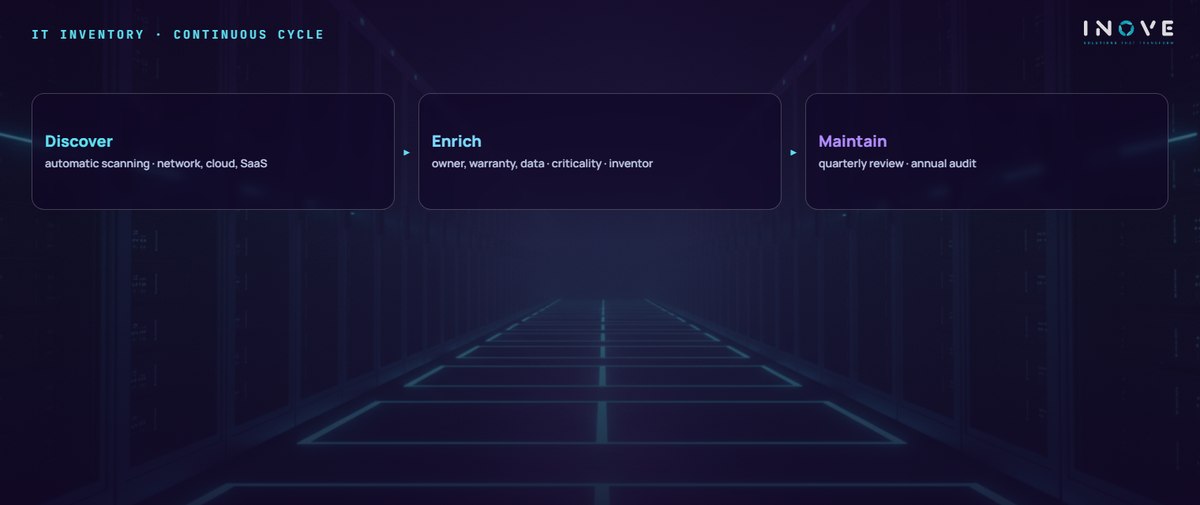
Next, use automatic discovery: device-management agents, cloud consoles, and ITAM (IT asset management) tools scan the environment and record everything on their own. A manual spreadsheet works to get started, but it goes stale the following week. Automated collection is what makes the inventory sustainable.
3. Enrich each asset
For every item, record: owner, location (physical or cloud), purchase date, warranty, maintenance history, business criticality, and the data it stores. That last field has become mandatory: LGPD, the Brazilian data-protection law, requires knowing where personal data lives.
4. Classify by criticality
Then, not every asset matters equally. Separate what stops the company if it fails from what is merely inconvenient. This classification guides preventive maintenance, redundancy, and service priority.
5. Establish the update routine
Finally, define the cycle: continuous automatic discovery, quarterly management review, and an annual audit. Every asset entering or leaving the company goes through the inventory — including employee offboarding, when access and equipment must be recovered the same day.
Common mistakes that undo the work
- Inventorying only the physical — today the biggest cost and risk live in SaaS and the cloud, exactly what the traditional spreadsheet cannot see.
- Over-detailing — recording fifty fields per asset guarantees no one will fill them in. Start with the ten that matter.
- Forgetting offboarding — likewise, returned assets and revoked access must show in the inventory the same day, or the map lies.
- Not integrating with finance — finally, an inventory that does not talk to contracts and invoices loses half its value.
What the inventory unlocks
With the map in hand, decisions that were guesswork become arithmetic. License renegotiation starts from actual usage. Replacement planning anticipates warranty expirations instead of reacting to failures. Security gains its most elementary foundation: you cannot protect what you do not know exists — every serious protection program starts with the asset inventory.
The inventory also feeds the rest of management: the annual budget, the infrastructure capacity plan, and even incident response, which needs to know in seconds which machine was affected and what runs on it.
In short, the IT inventory is the silent bedrock of good management: cheap to build, expensive to lack. Start with the scope that hurts most — usually licenses and access —, automate the collection, and establish the routine. Within a few weeks, the company starts making technology decisions with a full view of the terrain.