



Output that never prints: no spool, no error, no log

The call came in on a Thursday. Invoices were not printing.
This is not just any technical problem — an invoice that does not print is goods that do not ship. The truck sits in the yard, the order is not billed, and every hour costs more. It is the kind of ticket that jumps ahead of everything else.
What nobody imagined is that it would take eleven days to find the cause. And that the cause would sit three screens away from everything that was investigated.
Day 1: the problem does not behave like a problem
The first thing you do is reproduce it. Click print, and here comes the detail that would shape the whole investigation: nothing happens. No error message. No warning. The screen does not complain about anything.
There was a second system — the QA environment — running the same release, the same code, the same configuration. There the invoice printed every day without fail. Twin environments, one working and one not.
That is simultaneously the best and the worst news possible. Best because it gives you a reference point. Worst because it means the difference is hiding somewhere nobody thought to look.
The week of reasonable hypotheses
It started with the obvious, as it always does.
The printer. There really was a configuration difference between the two environments. It was corrected with some hope. It did not help.
The printing system. Maybe it was jammed? No: more than seventeen thousand documents had printed that week on the same system. Healthy.
The form and the PDF engine. Tested on both environments, identical response.
The software version. Component by component, same update level on both.
User authorization. Authorized on both.
A week in, the list of ruled-out causes was long and the list of suspects was empty. And every check that came back “identical on both” made the problem stranger, not clearer.
The silence nobody had found strange
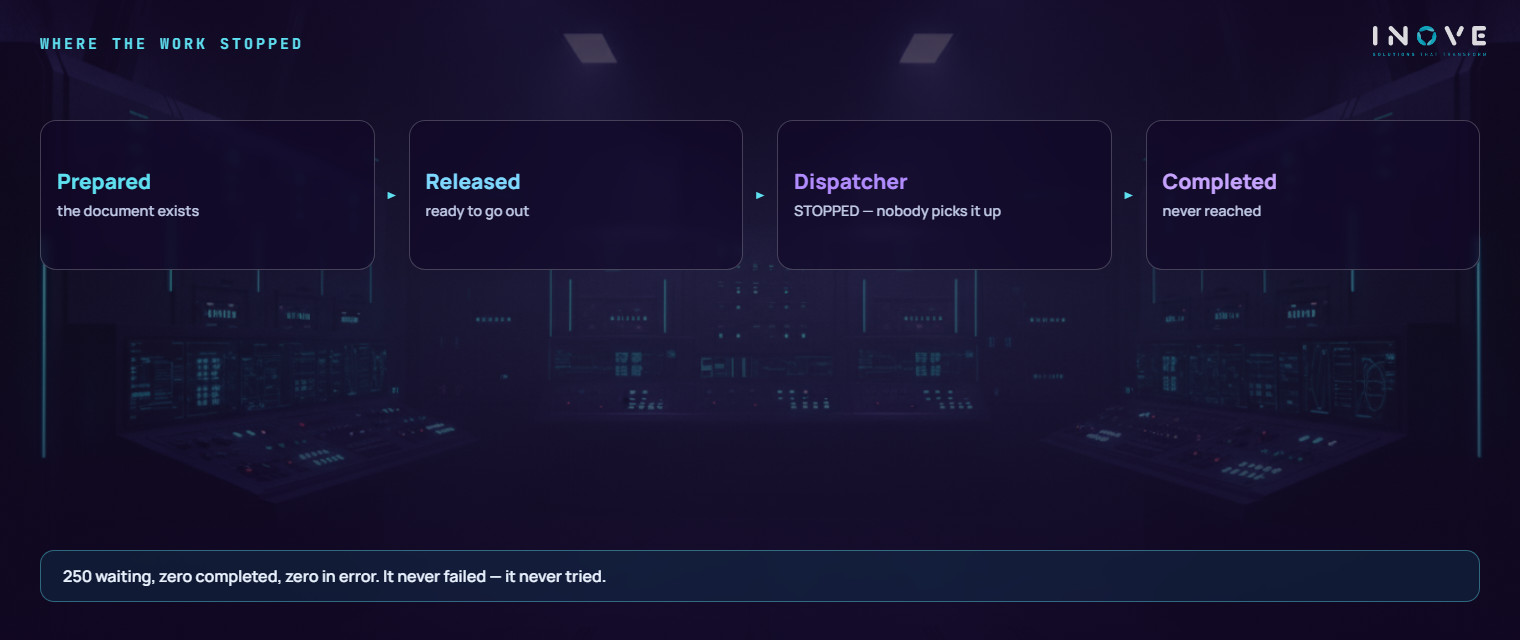
The shift in perspective came from a simple count. Every document to be printed becomes a record with a state: in preparation, released, in process, completed, or error.
On the failing environment:
- 250 documents stuck in “in preparation”
- 7 in “released”
- zero completed
- zero in error
That last number is the finding. Nothing had failed. Nothing had even tried.
That is why no monitor beeped, no log recorded anything, no alert fired. Monitoring tools find failures. There was no failure there — there was an absence. And an absence triggers nothing.
The discovery that set everything back
On the eighth day came what looked like the answer. Skipping the normal path and telling the system to issue the invoice directly, it printed. Four seconds, document in the queue, completed.
The reading was immediate and natural: if it works when I call it directly, the problem is in whatever calls it. The investigation turned to the program that triggers printing, and went as far as isolating the exact line where it seemed to fail. Everything fit.
And it was wrong.
The direct call worked precisely because it skipped the broken piece rather than going through it. The test that seemed to confirm the hypothesis was in fact the proof that the hypothesis was looking in the wrong place — only read backwards.
Two more days went that way. This is how a long investigation gets expensive: not through a careless mistake, but through a coherent theory that explains everything you can see — and nothing you have not looked at.
The question that was missing
On the eleventh day somebody asked a question that was not about printing: how many jobs are queued waiting to run?
On the QA environment, where everything worked: zero. It ran immediately.
On the failing environment: 109,678.
A hundred and nine thousand units of work sitting there, waiting. Fifty-six of them were the invoices. The other hundred and nine thousand six hundred were everything else that system should have been processing in the background — including one queue that had been stuck for over a month without anyone noticing.
An address that did not exist
The component that hands out this work needs a supervisor to run. That supervisor has a connection address configured — and on that system the address pointed at an environment that did not exist there.
It was a client number valid on another system in the landscape, most likely copied in some old configuration. On the QA environment that client genuinely exists — and that is exactly why everything always worked there.
With no valid supervisor, the work dispatcher hands out nothing. Documents were prepared, released, and then waited for somebody who would never come. No error, because there was no failure.
Eleven days of investigation for one field with the wrong number.
What this case teaches
A system that is “up” is not a system that is working. That environment passed any availability check. It was on, it responded, it had users connected. And for weeks it had not been executing part of the work.
Zero errors is not good news — it is a question. When a process should produce a result and produces neither success nor failure, the defect is rarely in the process. It is in whoever should have picked it up and did not.
“It works when I do it manually” is a clue that the problem is in the automation, not in the task. Here it was read backwards, and it cost days.
Comparing two environments is the strongest tool there is — as long as you compare the right thing. Comparing configuration worked. Comparing program size did not, because the number that looks like the code size is actually its compressed size.
The honest limit
Eleven days is a lot, and most of it went into reasonable, wrong hypotheses. There is no promising the next investigation will be short — a silent symptom is expensive by nature, because it leaves no trail.
What can change is the order of the questions. Before investigating the process, confirm the infrastructure running it is alive — the queue, who dispatches it, where it points. Four ten-minute checks that here would have saved ten days.
Why this is a diagnostic case, not a support case
Notice what was happening next to the problem that opened the ticket. The invoice was 56 out of 109,678 stalled units — less than 0.1%. Everything else was not being processed either, and nobody had raised a ticket about any of it.
That is the difference between support and diagnostic. Support answers what hurts. A diagnostic looks at the whole environment and finds what is broken before it hurts — the queue piling up, the process that does not run, the setting pointing nowhere. None of that raises an alarm, because none of it is an error.
The symptom that generated the phone call was the only one anyone noticed. It was not the only one there was.
If you suspect there are things stopped in your environment that nobody has noticed, that is exactly what the IT diagnostic looks for. And if the pattern of “it fails a different way every day” sounds familiar, the path is directed investigation, not guessing.